
 HOME
HOME  ABOUT
ABOUT  SERVICES
  PRICING
  CONTACT
  RESOURCES
  PORFOLIO
  PROCESS
  ACCOUNT
  PAYMENT
  CLIENT
  REGISTER
  LOG IN



 CSS
CSS 
 HTML
HTML  JAVASCRIPT
  PHP
PHP  SQL
SQL  Resource Center
 Client Dashboard
 Account Details
 Pay Your Balance Online
 Lookup Payment History
 Customer Support
 View Your Website Progress
 Visit Your Online Website
 Forgot Password
 Forgot Username
 Change Password
HTML Website Development & Design
HTML is the foundation of every website. It provides the structure that organizes everything visitors see on a page, including headings, paragraphs, images, buttons, navigation menus, links, forms, and other website content.

At Penguin Websites, we use clean, organized HTML to build websites that are easy to navigate, responsive, and designed to work reliably across modern browsers and devices. Well-structured HTML also gives CSS and JavaScript a solid foundation for adding professional styling, interactive features, and functionality.
HTML determines what appears on a webpage and how the content is organized. CSS controls how that content looks, while JavaScript adds interaction and functionality. Together, these technologies allow us to create customized websites that are attractive, practical, and easy for visitors to use.
Building Website Navigation with HTML

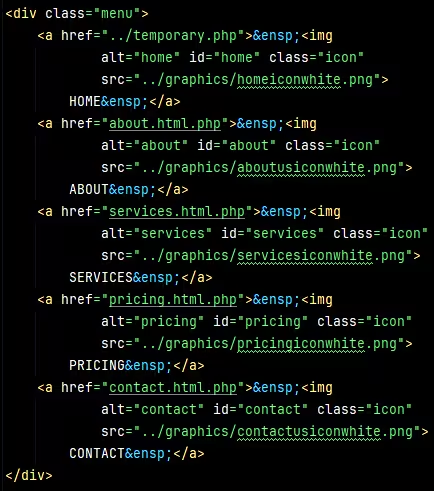
Below is the HTML code used to create the top navigation menu at Penguin Websites. This code provides the underlying structure for the menu, including its links and other elements that help visitors navigate throughout the website.
Each menu item is defined within the HTML and connected to a specific page or section of the website. By organizing these links into a clear structure, HTML helps visitors move easily from one area of the site to another.
Creating Website Forms with HTML
HTML forms allow visitors to enter and submit information through a website. They can include text fields, email fields, dropdown menus, checkboxes, and buttons.
At Penguin Websites, we use HTML to organize forms so that they are clear and easy to use. If you visit the Register Page or the Free Consultation Page on Penguin Websites, you will see HTML forms in action.
Below is an example of the HTML used to create a basic website form. Just fill in all the fields of the form and click Submit to view the output in the New Message window.
New Message
Organizing Website Content with HTML

HTML helps organize website content into a clear structure using headings, paragraphs, images, links, lists, and other elements. This structure makes information easier for visitors to read and navigate.
At Penguin Websites, we use HTML to arrange content in a logical way so each part of a webpage has a clear purpose. Well-organized HTML also helps create pages that are easier to maintain as a website grows.
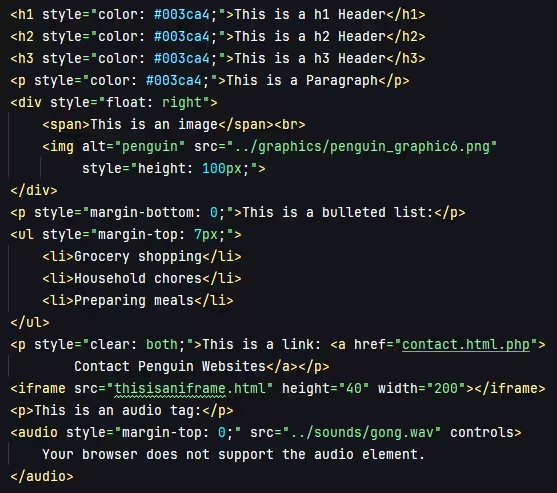
Below are examples of some of the elements that make up the content of an HTML page. The examples show how the elements appears on a webpage. The HTML code used to create it displayed directly below the elements.
This is a h1 Header
This is a h2 Header
This is a h3 Header
"This is a Paragraph"

This is a bulleted list:
- Grocery shopping
- Household chores
- Spending time with family
This is a link: Contact Penguin Websites
This is an audio tag:
Building Better Websites with HTML
HTML is the foundation of every website, providing the structure that organizes its content and gives each page its basic framework. At Penguin Websites, we use well-organized HTML to create headings, paragraphs, images, links, navigation menus, forms, lists, and other elements that make a website clear, useful, and easy for visitors to navigate.
 HOME
HOME ABOUT
ABOUT SERVICES
 PRICING
 CONTACT
This page has been visited 29 times.
© penguinwebsites.com